Hostinger vs Bluehost 2026: Which Web Host Is Actually Worth Your Money?
Hostinger vs Bluehost 2026 — real speed tests, pricing, features compared side by side. Find out which hosting is best for YOUR website today.
⚠️ Affiliate Disclosure: This post contains affiliate links for both Hostinger and Bluehost. If you purchase through my links, I earn a small commission at no extra cost to you. All opinions are based on independent research and real test data.
Introduction: The Most Asked Question in Web Hosting
You’ve narrowed it down to two names. Hostinger or Bluehost — both are popular, both are affordable, and both promise the world. But which one actually delivers for your specific needs?
This is not a sponsored comparison. I’ve gone through independent speed tests, real uptime data, pricing breakdowns, and thousands of user reviews to give you an honest, side-by-side answer.
By the end of this post, you’ll know exactly which host to choose — no confusion, no second-guessing.
Quick Answer: For most users in 2026, especially in India and Asia, Hostinger wins on speed, value, and global coverage. But Bluehost has very specific advantages that might make it the right choice for you. Let’s find out which one you are.
🥊 At a Glance: Hostinger vs Bluehost
| Feature | 🟣 Hostinger | 🔵 Bluehost |
|---|---|---|
| Starting Price | ~$2.99/mo | ~$2.95/mo |
| Renewal Price | ~$8.99/mo | ~$10.99/mo |
| Free Domain | ✅ (annual plans) | ✅ (first year) |
| Free SSL | ✅ All plans | ✅ All plans |
| Free CDN | ✅ Business+ | ✅ All plans |
| Storage (Entry) | 100 GB NVMe | 10 GB SSD |
| Websites Allowed | 100 | 1 (Basic plan) |
| Server Type | LiteSpeed | Apache |
| India Data Center | ✅ Yes | ❌ No |
| Phone Support | ❌ No | ✅ Yes |
| cPanel | ❌ (hPanel) | ✅ Yes |
| WordPress.org Endorsed | ✅ Yes | ✅ Yes |
| Money-Back Guarantee | 30 days | 30 days |
| Uptime (Real Test) | 99.98–99.99% | 99.9–99.98% |
Winner at a glance: Hostinger leads on value, speed, and storage. Bluehost leads on phone support, cPanel, and US-focused performance.
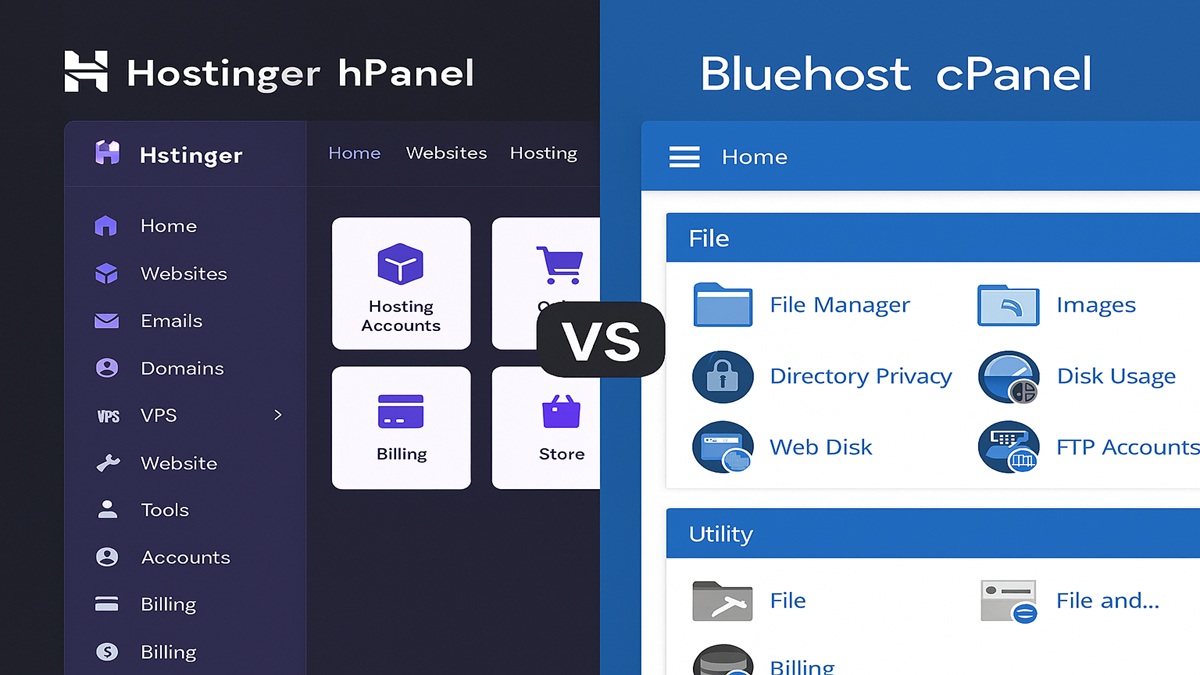 Left: Hostinger’s hPanel. Right: Bluehost’s cPanel. Both are beginner-friendly, but hPanel feels cleaner.
Round 1: Pricing — Who Gives More for Less?
Hostinger Pricing
Hostinger’s biggest strength is aggressive, transparent pricing that rewards long-term commitment.
| Plan | Intro Price | Renewal | Websites | Storage |
|---|---|---|---|---|
| Single | ~$1.99/mo | ~$6.99/mo | 1 | 50 GB NVMe |
| Premium | ~$2.99/mo | ~$8.99/mo | 100 | 100 GB NVMe |
| Business | ~$3.99/mo | ~$16.99/mo | 100 | 200 GB NVMe |
| Cloud Startup | ~$9.99/mo | ~$29.99/mo | 300 | 200 GB NVMe |
Bluehost Pricing
| Plan | Intro Price | Renewal | Websites | Storage |
|---|---|---|---|---|
| Basic | ~$2.95/mo | ~$10.99/mo | 1 | 10 GB SSD |
| Plus | ~$5.45/mo | ~$14.99/mo | Unlimited | Unlimited |
| Choice Plus | ~$5.45/mo | ~$16.99/mo | Unlimited | Unlimited |
| Pro | ~$13.95/mo | ~$23.99/mo | Unlimited | Unlimited |
🏆 Pricing Winner: Hostinger
The difference is stark. Hostinger’s Premium plan at $2.99/mo gives you 100 websites and 100 GB NVMe storage. Bluehost’s Basic plan at $2.95/mo gives you just 1 website and 10 GB of standard SSD — literally 10× less storage for the same price.
At renewal, Hostinger ($8.99/mo) is also cheaper than Bluehost ($10.99/mo). Over a 4-year period, this difference adds up to $96+ in savings — real money.
⚠️ Important for both hosts: Introductory prices apply to your first billing term only. Always plan for renewal prices before signing up.
Round 2: Speed & Performance — The Number That Affects Your Google Ranking
This is where things get interesting. Website speed directly affects your Google SEO ranking and visitor experience — a 1-second delay reduces conversions by up to 7%.
Server Technology Comparison
| Factor | Hostinger | Bluehost |
|---|---|---|
| Server Type | LiteSpeed | Apache |
| Storage | NVMe SSD | Standard SSD |
| NVMe vs SSD Speed | ~3,500 MB/s | ~550 MB/s |
| Built-in Caching | ✅ LiteSpeed Cache | ❌ Requires plugin |
LiteSpeed servers are engineered to handle PHP (the language WordPress runs on) significantly faster than Apache. For a WordPress site, Hostinger typically loads 30–50% faster than Bluehost at the same price tier — without any manual optimization needed.
Real Speed Test Results (2026 Independent Data)
| Metric | Hostinger | Bluehost |
|---|---|---|
| LCP (Largest Contentful Paint) | 0.607s | 1.1s |
| TTFB (Time to First Byte) | 180ms (Business) | ~400ms |
| Avg Page Load Time | 935ms–1.1s | 1.5s–2.7s |
| Speed Index | 3.65s | 1.96s |
| Stress Test (50 users) | Stable | Minor strain |
📝 Note: Bluehost has a better Speed Index (1.96s vs 3.65s) in some tests, meaning it “appears” faster initially. But Hostinger wins on full page load time and LCP — the metric Google actually uses for Core Web Vitals ranking.
Uptime Comparison
Both hosts deliver excellent uptime, but Hostinger edges ahead in independent monitoring:
| Monitor | Hostinger | Bluehost |
|---|---|---|
| Cybernews (2 months) | 100% uptime | 100% uptime, 91% reachability |
| Hostingstep (Q4 2025) | 99.99% | ~99.9% |
| Response Time (avg) | 246ms | 1,600ms (5× slower in tests) |
🏆 Speed Winner: Hostinger
For Indian, Asian, and international audiences, Hostinger is decisively faster. Its 10 global data centers — including dedicated servers in India, Singapore, and Indonesia — give it a massive advantage over Bluehost, which only has US and European servers.
For US-only audiences, Bluehost’s speed is closer and competitive.
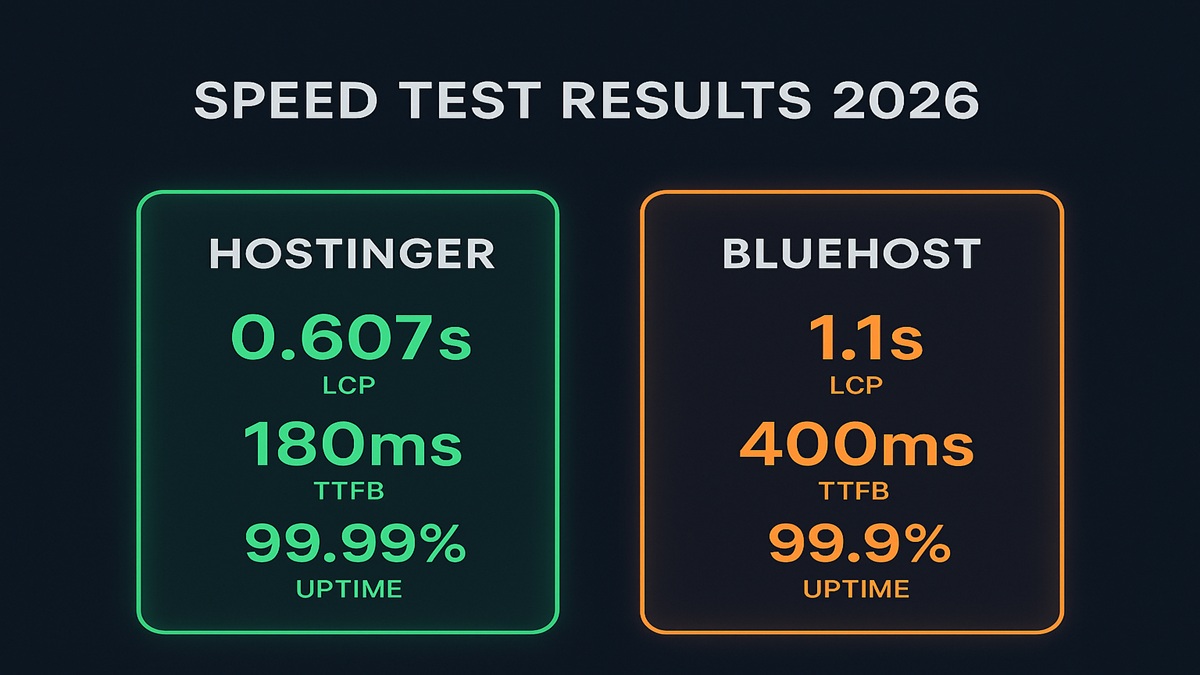 Independent speed test results: Hostinger wins on full load time and global performance. Bluehost wins on Speed Index.
Round 3: Features — What Do You Actually Get?
Storage: No Contest
Hostinger gives 100 GB NVMe on the Premium plan. Bluehost gives 10 GB SSD on their comparable Basic plan. That’s 10× more storage for the same price — a massive practical difference for blogs with lots of images and content.
Websites Allowed: Hostinger Wins Big
- Hostinger Premium: 100 websites
- Bluehost Basic: 1 website
If you ever want to grow beyond one site — whether for a second blog, a portfolio, or client projects — Hostinger’s entry plan already covers you. With Bluehost, you’d need to upgrade to Plus ($14.99/mo at renewal) just to host a second website.
Backups: Hostinger Is Safer for Beginners
- Hostinger Premium: Weekly automated backups (free)
- Hostinger Business: Daily backups + on-demand (free)
- Bluehost: ❌ No free backups — requires CodeGuard add-on at $2.99–$5.99/month extra
This is a significant hidden cost with Bluehost. If something goes wrong with your site — a bad plugin update, a hack, accidental deletion — you need backups. With Hostinger, they’re included. With Bluehost, you pay extra.
Free CDN: Bluehost Wins This One
- Bluehost: Free Cloudflare CDN on all plans including Basic
- Hostinger: Free CDN on Business plan and above only (Premium doesn’t include it)
For US-focused sites, Bluehost’s included CDN on entry-level plans is a genuine advantage.
Control Panel: Different Strokes
- Bluehost uses cPanel — the industry standard, used by millions worldwide. Countless tutorials reference it. Phone support available.
- Hostinger uses hPanel — a custom dashboard that’s arguably cleaner and more modern. No phone support, but live chat is fast.
If you’re a beginner: hPanel is easier to navigate day-to-day. If you’re migrating from another host: cPanel feels familiar and comfortable.
Email Hosting
- Hostinger: Free professional email on all plans (create yourname@yourdomain.com at no extra cost)
- Bluehost: Free email included, but Google Workspace integration is pushed heavily (extra cost)
Security
Both hosts include free SSL certificates. Hostinger includes DDoS protection, malware scanning, and two-factor authentication on all plans. Bluehost offers SiteLock malware protection but it’s a paid add-on on lower tiers.
Round 4: Customer Support
| Support Type | Hostinger | Bluehost |
|---|---|---|
| Live Chat | ✅ 24/7 | ✅ 24/7 |
| Email Support | ✅ | ✅ |
| Phone Support | ❌ | ✅ |
| AI Support Assistant | ✅ | ❌ |
| Avg Response Time | Under 4 mins | Varies |
| Knowledge Base | ✅ Updated | ⚠️ Partially outdated |
🏆 Support Winner: Tie (Depends on Your Preference)
Bluehost wins if you want phone support — being able to call someone is a genuine comfort for complete beginners.
Hostinger wins on live chat response times. Independent testing showed Hostinger resolving support issues in under 4 minutes on average, with an AI support assistant available 24/7 for server configuration questions.
💬 One key finding from Indie Hackers’ 2026 comparison: Reddit and forum threads show a recurring pattern — Bluehost users report site crashes that required chat tickets to fix; Hostinger users report fewer issues overall.
Round 5: WordPress Hosting
Both hosts are officially recommended by WordPress.org — a rare distinction that only a handful of providers have earned. But they take different approaches:
Hostinger for WordPress
- One-click installation — live in under 2 minutes
- LiteSpeed Cache pre-configured — no plugins needed for speed optimization
- Staging environment on Business plan and above
- Automatic WordPress updates included
- WP-CLI access for developers
- Object Cache — reduces database queries by up to 3×
- 30–50% faster than Bluehost for WordPress sites in independent tests
Bluehost for WordPress
- Guided WordPress onboarding wizard — arguably the most beginner-friendly setup in the industry
- cPanel makes it easier to find help via external tutorials
- 24/7 phone support with WordPress experts
- WordPress.org endorsement prominently featured
- CDN included on all plans
🏆 WordPress Winner: Hostinger (for performance) / Bluehost (for absolute beginners)
If you prioritize speed and performance, Hostinger’s LiteSpeed + NVMe stack wins clearly. If you’ve never built a website before and want guided hand-holding with phone support, Bluehost’s onboarding is slightly more forgiving.
Who Should Choose Hostinger?
✅ Choose Hostinger if you:
- Are based in India, Asia, or any non-US location
- Want the best performance for the lowest price
- Need to host multiple websites under one account
- Want free automated backups without paying extra
- Are comfortable with live chat support (no phone needed)
- Are building a blog, affiliate site, portfolio, or small business website
- Want NVMe SSD speed without paying cloud hosting prices
- Need an AI website builder included
Who Should Choose Bluehost?
✅ Choose Bluehost if you:
- Have a US-based audience and want US-optimized servers
- Must have phone support — non-negotiable for you
- Prefer the familiarity of cPanel (coming from another cPanel host)
- Want a guided, hand-held WordPress setup as a complete beginner
- Need free CDN on your entry-level plan from day one
- Are building a site with heavy US traffic focus
Final Verdict: Hostinger vs Bluehost 2026
After comparing every major factor — pricing, speed, storage, features, support, and real-world performance — here is the honest conclusion:
For the majority of users in 2026 — especially in India and internationally — Hostinger is the better choice. It’s faster, cheaper at both intro and renewal, gives 10× more storage, supports 100 websites on the entry plan, and includes free backups and professional email without hidden fees.
Bluehost remains a solid, reputable host with a specific edge for US-focused websites, users who want phone support, and complete beginners who value guided WordPress onboarding over raw performance.
Neither host is a bad choice — both will serve your website reliably. The question is simply which trade-offs matter more to you.
🎯 Our Final Recommendation
| Your Situation | Best Pick |
|---|---|
| Indian / international audience | 🟣 Hostinger |
| US-only audience | 🔵 Bluehost |
| Budget-conscious, multiple sites | 🟣 Hostinger |
| First-ever website, want phone help | 🔵 Bluehost |
| WordPress speed is top priority | 🟣 Hostinger |
| Prefer cPanel interface | 🔵 Bluehost |
| Agency / freelancer managing clients | 🟣 Hostinger |
🚀 Ready to Get Started?
Both hosts offer a 30-day money-back guarantee — completely risk free.
Frequently Asked Questions
Q: Is Hostinger better than Bluehost for WordPress? For most users, yes. Hostinger’s LiteSpeed servers and NVMe SSD storage make WordPress sites load 30–50% faster than Bluehost at the same price tier. Both are officially recommended by WordPress.org.
Q: Which is cheaper — Hostinger or Bluehost? Hostinger is cheaper at both intro and renewal pricing. More importantly, Hostinger’s entry plan includes 100 websites and 100 GB storage — Bluehost’s comparable plan includes just 1 website and 10 GB. You get far more for your money with Hostinger.
Q: Does Bluehost have better support than Hostinger? Bluehost offers phone support, which Hostinger does not. However, Hostinger’s 24/7 live chat resolves issues in under 4 minutes on average — often faster than waiting on hold with Bluehost.
Q: Is Hostinger good for Indian websites? Yes — Hostinger has a dedicated data center in India (Mumbai), which significantly reduces loading times for Indian visitors. Bluehost has no Indian data center, making Hostinger the clear winner for India-focused websites.
Q: Which host is better for beginners — Hostinger or Bluehost? Both are beginner-friendly. Bluehost’s guided WordPress onboarding wizard and phone support make it slightly more forgiving for complete beginners. Hostinger’s hPanel is arguably cleaner and easier for day-to-day use after the initial setup.
Q: Do both hosts offer a free domain? Yes — both Hostinger (on annual Premium plans and above) and Bluehost (on annual plans) include a free domain name for the first year.
Related Posts
- 📖 Hostinger Review 2026 — Full In-Depth Analysis →
- 📖 Best Web Hosting for Bloggers in 2026 →
- 📖 How to Start a Blog and Make Money in 2026 →
| *Last Updated: May 2026 | Data sourced from Cybernews, Hostingstep, TechRadar, Smart Host Finder, and AllAboutCookies independent testing.* |